


You are probably wondering – what the heck is that thing?. . This is the “maintenance tank” from my Epson 4800 which had to be changed recently. . As the printer goes through cleaning cycles, it dumps waste ink into this tank filled with cotton pads. . Unfortunately, it is also a very environmentally unfriendly aspect of Epson’s wide format printers. This isn’t no ordinary waste bucket – it is a ‘smart one.’. It has a chip in the side that prevents you from cleaning it out and putting it in again. Epson implies that this tank should be thrown out, and you buy a replacement one from them for 40 bucks. . Making money on me from $1,375/gallon ink and cleaning clogs is one thing, but making money on me because of 2 lbs (yes, I weighed it) of landfill waste you caused by design is going too far.
Given Epson has a large environmental awareness section of their website, I decided to write to them to ask of their plans to address this anything-but-green feature of their professional printers I was really hoping for a better response considering this waste tank design has been in the market for many, many years now. . I believe it is the same in their latest generation as well. I feel like it is a somewhat canned response since she refers to inkjet cartridges, not the waste tank I specifically wrote about.
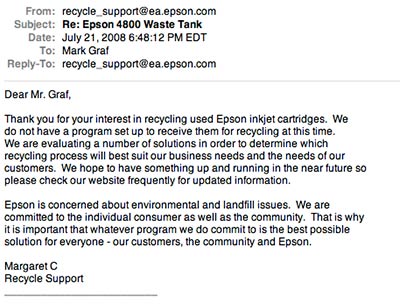
Of course, poor designs lead to others’ capitalization of it I have options other than buying brand new tanks:
1. Sending the tank into a recycler, who will sell back the tank back to me with the chip reset and new absorbent guts, or a refurbishment tank left by someone else Cheaper than buying from Epson, it doesn’t end up in a landfill, but still too pricey for a waste tank. Nice try – but no thanks.
2. Get my own chip resetter from Ebay and replace the absorbent material myself, (could be papertowel, sponges, anything that prevents the ink from sloshing around) which is what many owners of the Epson wide-formats have done. . (Simply search Ebay for 4800 (or whatever model) chip resetters and quite a few show up)
I am going for Option 2 It is a real shame we have to resort to such workarounds when manufacturers don’t listen It saves the consumer money and more importantly prevents these containers from ending up in landfills. . If you are finding this post in a Google search on maintenance tanks (which will undoubtedly happen within a few weeks) – I encourage you to also write to Epson complaining about this If they get enough concerns, perhaps the responses will stop being so generic and contain a bit more addressing the actual issue.


yep they dont care about the environment and welldone for educating us all on this matter, i think people need to know of these dirty tactics these companies use. anyway i have found a website which gives one pound to green charities to help the rainforests when you buy an ink cartridge from them, which i think is a great idea and they are cheaper than most ink cartridges retailers the url is amazon-ink .co.uk o by the way they only ship to the uk, enland.
I found a site online – bytes2print – they’re in California, and if you mail them your 110 or 220 Epson cartridges and your maintenance tank they’ll give you a credit toward their products (they sell ink, paper, etc.). Of course it might cost $5 to mail off and get a $15 credit…
Interesting post! – I have an Epson 2000 printer, and I haven’t even looked if there is some kind of tank like that on that printer.
It is obvious that printer manufacturers make their money mostly from selling ink and such, rather than the printers.
Glad you can bypass that stupid chip!
At least where I live they don’t use landfills, the garbage is either recycled or burned (and the heat used to generate electricity).
Owning the Epson 3800 for over a year, my maintenance tank now needs replacement. Appreciate the post. Unfortunately there is no chip available for the 3800 on Ebay or the web that I could find. Still have 5% left if anyone knows where to locate one or other option.
Canon does the same thing with some of their printers, or at least from my experience. You’re lucky that you can actually remove the dump bucket, clean it, and (hopefully) reuse it.
Shame that this is still happening. I thought going green was “cool and hip” for companies…
Hey Mark
Great post – I hope more people pressure Epson into acting more responsibly – it’s a shame to see this kind of stuff.
Cheers
Carl
I have a simple ink jet printer by Epson and I was quite disgruntled when I found out there’s are pretty much the only printers that you can’t recycle the cartridge. Had I known that before I bought it, I’d have kept right on looking. Yes, it prints like a dream but at what cost???
I’ll tell you this much – If they don’t figure out a way to get on the EF bandwagon, I won’t be buying my NEXT printer from them.
Jim, one thing I don’t know is how the others handle waste ink. I am curious about that now.
Very informative post Mark. I’m gearing up shopping around for my next printer. I’ll be keeping this aspect of printer ownership and maintenance in mind. I’m shocked Epson isn’t acting more responsibly in this area.
I’ve never done it, but on the 7600 you can reset the chip via the control panel (no extra hardware needed).
I just replace the tank. I figure, this is still lots cheaper, and tons better environmentally, than all the chemicals we used to wash down the drain in our chemical darkrooms.
You’ve pinpointed why Epson handles these the way they do; “It saves the consumer money…” They can’t have any of THAT now, can they? Not when that nice, juicy consumer money can be lining their pockets (environment be damned.) As a former computer parts buyer, I do whatever I can to avoid Epson altogether. Parts are often difficult & expensive to get (manufacturer ONLY.)
Congrats on the e-card thing, btw!