


My old Mac Pro finally has a replacement. Over the years, people may have noticed my remarks about my system getting up there in years. Apple’s recent product announcements happened to fall at a time that felt right for me. As such, I purchased a new Mac Studio (M1max config) along with a Studio Display.
Fourteen years is a pretty damn good run as far as computers go, especially when dealing with larger and larger image files, and more processor and memory-hungry plugins. Usually, some key part of your workflow becomes so time-consuming it triggers wanting a new system. But even as my DSLR files expanded from 4MP to 36MP, my use of layers and more sophisticated adjustments amounted to Photoshop files reaching over 1 GB in size, and my Lightroom catalog grew, my trusty 2008 Mac Pro handled all of it, albeit with a true test of my patience with specific tasks.
While a large part of this long life is due to the expandable nature of the trusty old cheesegrater design, an even larger part is credited to Mac enthusiasts like DosDude1 and Greg Grant, who offered the community their expertise and genius in keeping up with OS patches and some hardware upgrades well beyond support from Apple. Even as various pieces of other software established minimum OS requirements (even TurboTax!) they would run on, it didn’t seem to matter how old most of the hardware was with these patches in place. It is really quite amazing. And for most basic stuff, even some fairly intensive photo editing short of 4K video, this 14-yr old system remains just fine if you have some patience.
However, despite these folks tweaking every bit of life out of these systems, I was starting to accumulate a laundry list of things I just couldn’t do. When I got my drone, I could not process 4K video on my desktop (limited by display and GPU) – but ironically could on my phone. My version of Photoshop stopped with 2020 because of some specific hardware-related coding required in the newer chips. Tony Kuyper’s Luminosity Mask plugin moved on to require the more recent version of Photoshop’s coding (although TK7 suited me just fine). And despite some plugins like Topaz AI being able to run on my old setup, a single file was taking upwards of 15-20 minutes just to apply its sharpening magic. Despite these limitations, I was getting by – barely.
Then my Apple Cinema Display died late last year – with my Mac Pro probably highly insulted I replaced it with a budget-wise Lenovo one. The kid at Best Buy looked quite confused when I told him I needed an adapter to plugin into a DVI port. 🙂 As I’ve been watching the developments with Apple Silicon, I have been hesitant to make any big investments before knowing more about what is being planned. I felt I needed just a little more than the current offerings.
As it turns out, the Mac Studio and Studio Display seemed to be the right products – at the right time for me.
Initial Impressions
First off, a hat tip to the Packaging Engineers at Apple. I don’t know if they require you to go on sabbaticals with Origami masters in Japan, but you continue to impress. Both the Mac Studio and Studio Display had easy pull tabs and fold-out sections on the boxes that made for elegant removal, attention to detail for product protection, and obviously intended for re-use. Thankfully the damage on my box for the Studio Display was merely a flesh wound. And if this is all old news for recent Apple computers, all I can say is that I have been waiting for 14 years – cut me some slack in the simple pleasure of unwrapping eh? 🙂
Small stuff like braided power and Thunderbolt cables are a nice touch – especially because Apple cables on iPhones don’t exactly have robust reputations. Even the paper the Mac Studio and the Studio Display were wrapped in had a nice feel to them. And yet, packaging was fairly minimal. The Earth thanks you as well.
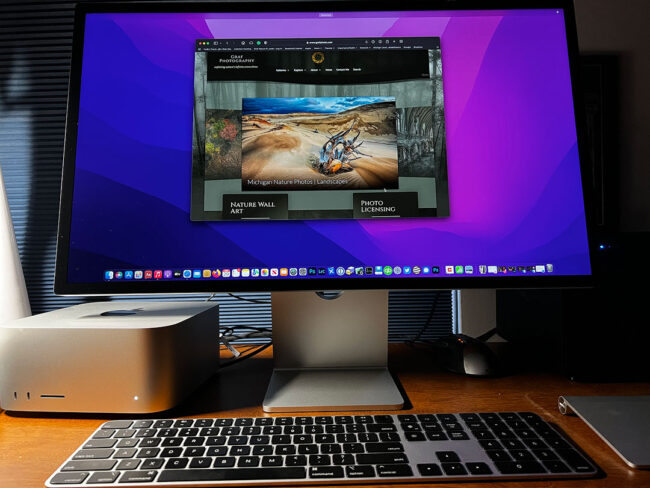
The form factor change is obviously significant in going from a large Mac Pro desktop to the size of the Mac Studio. They are two very different machines. It basically fits underneath one side of the display. This is quite welcome for me as I embrace more minimalist principles as I age. The display is also larger than what I am used to, moving up from 23″ HD resolution to 27″ 5K retina. I never had to turn my head to see each end of the display before. 🙂
Migration of software from my old Mac to the Mac Studio was pretty simple. Apple’s Migration Assistant took care of the bulk of it almost as simple as moving to a new iPhone. Monterrey is quite a beautiful operating system, even coming from one not that old in Catalina. I also bought a Thunderbolt enclosure for my photo storage drives that used to be inside the belly of my Mac Pro. One of my first delights was opening Lightroom and seeing my catalog pop up with all my images. I opened my email and it was basically where I just left off on the old machine. I am a huge, huge fan of easy.
I’ve seen various comments about the lack of expandability of these kinds of systems. Pretty much you have to pick the internal storage and RAM configuration upon purchase because of how everything is integrated into Apple’s new all-in-one chips and security features. And for those people, it seems likely a new Apple Silicon-based Mac Pro may be coming soon – start saving now. Frankly, my larger concern is just about being able to clean the thing for dust. Having two huskies puts some extra demands on air filtration systems in our house.
I do appreciate the much lower power consumption of this type of system, even if I am not depending on battery life. It is simply just another way to lower our impacts on this planet. Apple’s attention to power efficiency certainly has business advantages in being able to use the same chipsets across mobile and desktop, but it also helps lower emissions – which is a point that should receive more attention than it does for desktops.
It is not lost on me that one of the reasons I was able to go 14 years without a new computer was due to being able to upgrade graphics cards, memory, drives, device ports, and OS patches as my needs grew. I do wonder however if all that expense I put into upgrades over time was cheaper overall than just doing trade-ins before such systems lose the majority of their value. That’s an option now for most Apple products. We shall see.
All said this is quite a welcome and long overdue upgrade for me. I look forward to exploring everything this new system has to offer my workflow and enjoyment around developing photographs (and now video!).


Congrats! I’m tempted after reading this, but it’s an investment. Still, it sounds like a good one. I’m still on a PC and my system, ostensibly a good one crashed a few years ago with nothing recoverable. I too like the idea of taking less space, and of course, the elegance of the product – speaking of that, I’m totally with you on the packaging, after opening an iPhone and an iPad in the last year. So impressed with every single aspect of it, even, as you said, the feel of the paper. 🙂 Have fun!
I really like elegant! 🙂 So sorry to hear of the crash – something that I think impacts all of us in this digital world at some point. The only hope is the recovery (as in backups) can be as painless as possible.
Congratulations, Mark!!! Well deserved retirement after 14 years of service. I am envious of your new productivity tool and be interested in the long term relationship and results you have with it. You are a good photographer and deserve good equipment in your creative work.
Thanks, Monte. It’s a joy to use so far – a feeling that I hope lasts a long time.
Nice Mark. I’d have bought one myself if I didn’t buy the iMac a year ago. Hope you get many great years from this. Topaz runs like a breeze on my machine.
I think you were the only other photographer I knew working on a similarly old system. And I was likely going to follow the path you did – just the timing seemed to line up differently. It’s probably much nicer to work on very large print sizes – not only in screen space – but just in processing the large files.
Yeah. As my sales were increasing I didn’t have time to spare in particular with large prints which already take more time to work on in general. It was just time to upgrade at that point.
We already chatted about this, but be prepared to be disappointed with everything you did in the past once you see it on the 5k display — mostly, online photos. 😉 I’m still not comfortable uploading anything larger than ~1300 pixels on the long side to my website, but I fear that sooner or later, I’ll have to up the resolution because the hi-DPI displays are surely taking over…
I was kinda wondering about this – how much I would want to redo. I don’t know what the right balance is anymore on pixel dims quite frankly as tools to upsize have improved so much if someone wants to steal something. I certainly don’t want to make it too easy either.
Congratulation, Mark. You got your money’s worth from your Mac Pro, and I’m sure you’ll see substantial improvement in all areas with the Mac Studio. I recently had to replace my old Macbook Pro, and I went with an Apple M1 laptop and have been impressed with the speed and battery life so far.
I look forward to hearing further impressions soon.
Thanks. They seem to be doing well with these chips. It runs so quietly, all I hear are the fans in my HDD drive enclosure now – which is already annoying me. But until I can get 8 TB of SSD storage for a reasonable price, I guess I’ll have to make due.
It was fun to bask in your enthusiasm, Mark. Sad to say, my 27-inch 2012 iMac gave out a couple of months ago—really gave out—and I replaced it with the 2021 27-inch model. I’m perfectly happy with this computer, but wish my old one could have held out long enough for me to join you in exploring the Mac Studio.
That’s nearly 10 years for your iMac though right? That still seems impressive. I don’t engage in PC vs. Mac type debates but I don’t see people talking about PC systems lasting so long. I don’t know how much a Mac Studio offers over your relatively new machine – just the efficiency aspects of the new chips I suppose. Compared to my old one though, this is a breath of fresh air.
Congratulations on the new machine! 14 year is an impressive period of time to get out of a computer! Will be curious to hear how fast this is for your previously time consuming tasks. How much RAM did you put in this one?
I went with 64 GB, far more than I probably need since I was at 28 GB with the older one and rarely maxed it out. I seemed to be more limited by CPU and associated throughput with drives, etc. I haven’t run a test with Topaz Sharpen AI yet. 🙂 It better be faster!!
I went a bit low on my now 7-8 year old PC and it only has 16Gb in it which is usually the limiting factor when things grind to a halt for me. The 27″ monitor will take some getting used to (and maybe the switch to 5k too) but I really like the size myself.
The memory aspect is the one thing I wasn’t sure of in migrating to the new chips. I had read this system on a chip approach utilized memory in a more efficient way than Intel-based systems so I wouldn’t necessarily need to replace like for like since my Mac Pro had 28 GB. It is quite likely a system with lower memory could have run circles around my old machine just because of the newer architecture – but I just went with my gut to give some breathing room for “future-proofing” given I couldn’t add it later.