

I am going through a lot of my photo archive during this crazy pandemic AND finally getting around to spending some time with some tools I previously invested in. I have had Topaz Labs plugins for a long time. In general, they have always seemed like a pretty good company with quality tools. They give a lot of free updates or reasonable upgrade deals.
Still, over time, I either found some replacements that I liked better or helped me explore new directions I found interesting. As such, some of my older Topaz tools kind of started collecting dust. In December 2019, I saw some promotions about the new Topaz Sharpen AI.
Quite frankly, my first reaction was “What kind of photo sorcery is this???!” I received an upgrade deal from my old Topaz Sharpen collecting dust and the magic was convincing enough to click buy now. And there it sat, basically unused until this past couple of months when, shall we all say, we have a bit of time on our hands.
AI-assisted photography tools
As a layperson seeing “AI” mentioned, I wonder if I am being lured by clever marketing because it is a popular “buzzword.” Also a key question: Is this plugin just automating something I could normally just do in Photoshop with some extra steps and clicks? What value does it actually bring to my photography? Because as you know, there are a hundred different ways to accomplish the same results in Photoshop depending on your knowledge, time, and effort.
Now if you prefer video instead of reading a bunch of my words, I’ll point you to this introduction from Topaz below. If that is enough – be sure to skip to the conclusion here to see how you can save some money. When I first saw it, the blurry image they use as an example at the beginning … and what the software did with it … well – those sorcery thoughts came to mind again!
Honestly, an initial image like that wouldn’t last long in my archives. Instant delete. I don’t know how well it would enlarge or print, so take it with a grain of salt knowing it is a pretty dramatic example to start with. But I do have a lot of images just on the border of being soft, or a portion of the image is softer than I prefer.
Perceptions of sharpness
I really wanted to get to work on my own images. Here is the thing with sharpness and perception – it always seems to be a personal evolving standard. What I mean by that is you really don’t realize it until you see it with your own eyes. I remember when I was first getting more serious about photography. I used to take some photos, mostly handheld, I thought they were sharp on prints from the One-Hour Photo lab. (Yeah you youngsters – sometimes you had to wait before you saw a photo! 😉 Maybe even walk uphill in the snow to the lab! ).
I wasn’t blowing anything up big – but the photos were keepers. Then I started using a tripod more consistently, started using 35mm slide film, and recognized my old standard seeing sharpness was destroyed. Previous keepers went into the trash. Then one day I went to a lab to pick up some enlargements I had made. I saw this large 40×60″ (1×1.5m) landscape print on the wall that had stunning detail. I found out it was from a large-format camera. My sharpness perceptions again shattered!
I didn’t exactly go back and throw out everything as I wasn’t ready to invest in going large-format. But certainly, my eye became more critical. The same evolution happens with digital images and the megapixel wars. More and more detail, until a point where you decide for yourself personally, I have enough. Well, this AI/sorcery thing may just change some of our perceptions on what is possible.
Help with lens diffraction / soft distant horizons
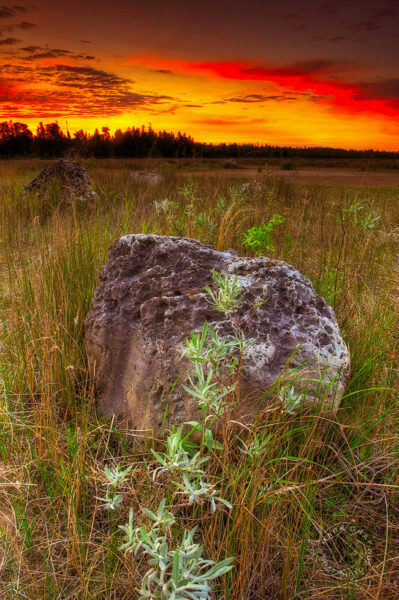
I found this image sitting in one of my undeveloped folders and just happened to pick it to play with. Now, I have a similar image, taken this very same morning on the north shore of Lake Huron, enlarged as a 30×45″ canvas gallery print hanging in my hallway. I exposed both landscapes using f/22 because I had very close foreground elements and wanted “acceptable sharpness” to the horizon. So some diffraction set in using that aperture.
For the canvas on my wall, the very distant horizon is actually a bit soft, but not so much to be a distraction or noted flaw. It’s probably more noticed by photographers than anyone else. I put a similar image through Topaz Sharpen AI and the result surprised me.
The software added more definition to those horizon details and made the sky detail a bit crisper and removed what little noise was there. Diffraction was certainly minimized, if not perceptibly eliminated. Many sharpening tools will actually make any noise appear worse, forcing you to selectively sharpen the image. I am thinking this is where the “AI” comes in – the program “knows” there is a sky there and acted accordingly.

So ok, this gave me some good results. But my inner skeptic told me don’t be a sorcerer’s fool. I need to check it against how I would normally sharpen this image for output. Is this tool going to change any of my perceptions of sharpness? Would I gain any of that detail just doing what I would normally do?
For years I have used Pixelgenius’s PK Photo Sharpener (now freeware) for print output. So I checked against that. PK Photo Sharpener is quite long in the tooth by now, but it is what I use and at one time, backed by some of the best output printers in the business.
I am not one to pixel peep much as print output is all that really matters. However, I am seeing a marked improvement by using a pre-output sharpened Topaz in comparison to a version already sharpened for output using PK. Given that, I am pretty confident I would see improvement in print results, especially in large prints.

Topaz Sharpen AI works with old computers
Given my Mac Pro is 12 years old (28 GB RAM running High Sierra), it is an understatement to say it is not a good modern benchmark for speed testing modern software. Can you picture putting a saddle on a snail? But what I can say is:
- Whataya know, it runs OK on a 12-year-old computer!
- Running Topaz Sharpen AI as a Photoshop 2020 Plugin on this detailed landscape took 36.8 seconds to return me back to Photoshop. No speed demon, but in my opinion, for a little sorcery on a snail cracker – not too bad.
Macro detail sharpening with Topaz Sharpen AI
The video above already shows great results in the photo of the chameleon. I applied Topaz AI to one of my recent orchid images. Here I was trying to balance the depth of field on the orchids while maintaining an out-of-focus background. Not everything was in the same plane here, so some little bits went soft. The results simply confirmed what I learned with my landscape. It popped out more detail where needed, and made the background a bit cleaner. All in a click.

Sharpening Wildlife photos with Topaz Sharpen AI
Here is a test I did on the face of a fox photograph I have. This particular image I kept, but always thought the face was a little soft. Not anymore. I was also happy it didn’t make the fur “too crunchy” looking. It looks completely natural. I will likely push this one a little bit more using manual mode.

How good is Topaz Sharpen AI? Final Thoughts
I think it is safe to say I have become a fan of this software. I don’t write about software much here, but this was one I thought worthy of sharing. In rummaging through my image closet, I am constantly coming across images that I have always felt are just a bit too soft. Too much heavy-handed sharpening just makes them crunchy. So I let them sit, and sit, and sit – never getting the nerve to delete them. I may never need the dramatic restoration shown in the video, but it is nice to know — it may be possible! I certainly have many photographs with sharpness flaws – now there may be hope for rescuing them.
Conclusion
It is very easy to use, doesn’t go overboard on sliders, and works in well-enough in auto mode most of the time so far. It is also a good value. I say bring on the AI! (Sorry Elon!). I’d recommend you check this out, a free trial is available.
My Rating – Topaz Sharpen AI
(Full Disclosure on links here)


Mark – Nice blog. Been an interested reader for about a year now.
I saw something quite different with Topaz Sharpen when I was trialing it at the end of 2019. The “Original” and “Preview” screen looked as good or better as what is written in the blog. But I noticed, for one photo that was very sharp as-is in Photoshop, that it seemed to be less sharp in the Topaz Sharpen “Original” pane than it was in Photoshop. I then started looking at a variety of photos this way: comparing the unprocessed Photoshop version with the Topaz Sharpen “Original” version. The “Original” version appeared to be defocused in every single instance relative to the unprocessed Photoshop version. The sharpened version looked comparable to what I could easily achieve in Photoshop without Topaz Sharpen. I checked about 25 photos. Same effect for all. That caused me to not use Topaz Sharpen and to go with different software (Capture One Pro). Has anyone else seen this occur with Topaz Sharpen? Just curious.
I’ll definitely have to look at that. I did turn the layer on and off with Photoshop and saw the improvements, but I did not compare the original preview from within the plugin to the one in PS.
I’ve been a Topaz Labs fan for years and own and use a number of their products. Their Sharpener AI and Denoise AI are both pretty capable and in some cases remarkable products, IMO. The examples you’ve shown in this post pretty much match with what I’ve found as well. I’d probably even give them 5 full stars. ?
I reserve that last 1/2 star for blow-my-socks off sorcery. 🙂
This software is truly impressive judging from your examples Mark. I’ve seen these claims made on websites and always wonder how true or realistic they are but this is certainly convincing. The advancements is software in the field of photography has been remarkable. I have recently taken photos of the night sky with a phone and was blown away by the results. I got images that I had never before been able to achieve with any success and yet, this phone, with its tiny sensor, delivered something exceptionally pleasing, and of course, it was all done with software. I’ve heard that it’s even possible to take a photo where the depth of field and the focal point can be determined in post and that this technology will be coming to regular cameras in the not too distant future. I can’t help but wonder what photographers will need to do in the future, in order to stand out artistically from the pack.
Yep, I wonder about the provided examples also, which is why I really appreciate when there is a free trial to try something out for yourself.
The variable focal point option is an intriguing one. I am thinking of the Lyto cameras that really never took off. I think, not sure, that this is all simply focus stacking which can be done manually. I have been playing with Helicon focus in this regard.
That has led me to start thinking about combining planes of focus, and how elements stack on top of each other.
I have no doubts technology will ultimately advance to make this much easier than it is now. Like you mention, so much as become easier just through apps on our phones, or the way phones can integrate some of these advancements easily.
I can only hope technology helps take some of the burden off the craft aspects of creativity. We don’t have to carry around heavy aluminum tripods (thinking the monster Gitzo 410 so popular with nature photographers) because of carbon fiber, higher iso capability, etc. all perhaps a good topic for another post!
We are pretty similar. I have always used Lightroom to capture sharpen (though for a time I was Using PK for that) but still use PK Sharpen for that mainly because the results were good and it was one click no decisions.
I also have Sharpen AI because I think I wanted to use the steep discount offered for those who had the old Topaz Sharpen. After reading your review I might have to give it a whirl.
Yep, exactly! If I can have a one click solution for something that is rather just a mechanical part of the process vs. a creative one, I’ll take it.
But these results have given me incentive to explore maybe a different software choice in pushing work to be as good as it can be. Definitely worth a little time to play with.
Going to have to take a look at it too.
I occasionally use Creative Sharpener, Special Effects, Depth of Field in conjunction with other adjustments but less now that Topaz is a more appreciated tool. Like you it sat gathering dust for a while. The winner of that oversight though was Lightroom. It took a few years before I went fully into using it. I use Tony’s actions for several features but not as much as I would like. For an old guy like me it’s hard to change from my trusted workflow but I am slowly adopting his tools. Sean’s videos are encouraging. Life is change.
Most of my noise control happens in LR processing also but I have used Nik’s Define 2 when needed.Shooting water in the woods before sunup allows a lot of noise to creep into the works.
I fully understand this Steve. I am much the same way. I find something AI like and choose to keep things simpler vs. having too many options or trying new stuff. If it weren’t for having this time to go through some old work, who knows how long it would have been before I really took a deep dive into this particular plugin.
I have to admit to complicating my life by watching Alister Benn’s YouTube channel and learning about different tools as well as expanding my seeing. As a guy who spend most of his time in the woods a lot of what he teaches would be a little difficult to apply but there’s always some little thing. Same for watching a few others like Sean Bagshaw, Adam Gibbs, and Simon Baxter. With time on my hands I have been trying to see how others experience what they shoot and present it. Learning never stops. I’d like to read more but that puts me to sleep.
I still use PKG’s Photokit Sharpener for my web output, but have started using Topaz Sharpen AI for process sharpening. No printing in a while so the jury is still out on that but so far I am impressed. Where was your discount when I purchased it? 🙂
I had one image that I hand held which contained motion blur. I had hoped it would be better as it was a shot unlikely to have another try at. Sharpen AI helped after some Photoshop shake reduction got me started. It was improved but a large print would likely still suffer. I posted a comparison last December. Since then I have found that using the Focus option really helped improve detail in some of my water in motion images. A bit pricey compared to PKG’s freeware…I paid for it years ago…but there’s already been one free upgrade. Now to look into Denoise AI.
You know, I remember that post now, Steve. I see that I liked it. In fact – it was Dec 2019 that I bought the Topaz Sharpen AI upgrade. I didn’t have my own discount then either. 🙂
I have only used PKG for print output. I tended to prefer the sharpening for web / resizing shortcut that comes with Tony Kuyper’s TK Panel. I have never experienced many issues with crunchiness with that.
I saw Denoise just got a big upgrade too – I have installed it but haven’t used it much yet. I’ll have to go back and look for some noisy stuff to play with. It is pretty rare I apply any Denoise outside of my initial RAW file adjustments. But now I have high expectations their AI will do some sorcery with noise too.