


The organization of my photo archive has certainly evolved over the years. The most notable change of course was in a move from analog to digital photography many, many years ago. My file cabinet full of 35mm slides sits basically untouched these days. It isn’t growing anymore, merely waiting for a moment of nostalgia or ambition to dig in there and digitize some gems that may remain. However, even with my film slides, it wasn’t long before I recognized the need for some type of numbering system to track each individual photograph.

Many people simply file their photos in date folders or maybe trip folders. They may even just use the default file names assigned by their camera. And now with so many photos from mobile devices, someone may not even know what the filename is if it remains on their phone.
However, back when I was using slides, and even now – I recognized I needed a system to keep track of photographs. When I need to find an image, I need to find it rather quickly to satisfy a client’s need or organize a potential submission. It also helps greatly to have a specific reference other than “Lake Sunset” in all sorts of communications with editors and photo buyers. Each photo needs a rather simple image ID#, much like a social security number, that would follow it wherever it went.

Using a photo database
I wrote an article for Naturephotographers.net in 2002 that was an adaption of a longer piece I used to have on my website. I originally developed a simple database in Microsoft Access that served as a central information hub for data about my slides.
In 2008 when I switched to using a Mac, I had to abandon my use of MS Access. A Mac program called Bento came to the rescue at the time, a rather lite version of the popular database Filemaker, and A LOT less expensive. To use Filemaker for my simple photo tracker would have been overkill. I was able to import all of my data to Bento allowing my system to continue in a different universe. I also started to expand what I was tracking for each image in more detail as far as licensing, copyright infringements, provenance information, even individual little stories I would include with print sales. Essentially, these individual datasheets for each photo were becoming like individual credit reports.
A little side story: I sold templates of my MS Access database for a while with some tutorial information and distributed it on CD. I mailed these CD-ROM’s all over the place and eventually just sent them via email. I wasn’t selling any when I switched to Mac, so I didn’t think much of just abandoning it. Yet, in 2018, ten years after switching to Mac, I received an email from a gentleman in Mexico. He mentioned he was going through some old things in his email, found the files I sent (developed in MS Access 2000), and mentioned how much he loved them. He asked if I had any updates because he was now using MS Access 2010. I felt bad I wasn’t able to offer him much help, but it was nice to have a reminder of how my “Graf System” still had a little life in it beyond my personal use even if the tech support left a lot to be desired!
Once my switch to digital photography was complete, much of my photo organization is within Adobe Lightroom. While I was able to abandon any need to keep track of things like keywords in a separate database, I still always needed this “social security number” and other text-based information. My image ID simply moved from being on a slide label to be a filename. And while Lightroom is amazing in the way you can sort folders, make collections, keywords, and even keep track of a lot of image information in EXIF or IPTC data – there was still this need for me to keep track of information I didn’t necessarily want to be embedded in the image file itself. So my database remains a key companion to my central organization within Lightroom.
keeping pace with technology
The risk when you attach anything to a technological solution is obsolescence. As someone who is still trying to squeeze every last ounce of useful life out of that very same Mac from 2008, I’ve had my share of “what now?” moments as the software evolved, 32-bit programs became unsupported, and software companies dropped support, leaving me much like that gentleman in Mexico. Somehow, I have always managed to find a way.
I faced such a dilemma recently when I wanted to update my OS from High Sierra (still only 3 years old) to something – well, more up to date. High Sierra was a long ways from my original install of Leopard (released in 2007) (and simply amazing I was still able to keep up thanks to this guy), but I kept seeing notices from various software companies stating they will soon be dropping support for High Sierra, forcing me to make another upgrade decision. Most of the impacts were relatively minor – but the major one – my database, Bento was simply no longer sold or supported and would not work beyond High Sierra.
I could export all my data and simply start using a spreadsheet program worst case. I would lose the convenience of a form-based input. Not ideal, but not catastrophic. Still, having a spreadsheet with well over 10,000 records is a bit cumbersome. An internet search revealed other Bento users that faced the same issue. That led me to a program called Tap Forms. The developers of Tap Forms obviously saw an opportunity to lure Bento users to their database program by incorporating an import option specifically for Bento data. Smart move.
Tap Forms database for Mac
I followed the instructions from the Tap Forms developers to create an export of my Bento data. Everything seemed to work without issue. However, the styling I once had did not transfer over. The Tap Forms “form” interface is a bit plain vanilla at initial import compared to how I had it customized in Bento (and Access before that). But I quickly learned how to customize it to jazz up the appearance some. My drop-down lists and even my small built-in mini-spreadsheets to track sums of licensing for each photo transferred over without issue. With a few other adjustments in learning how Tap Forms works, I was able to have my database up and running, and even better than before.
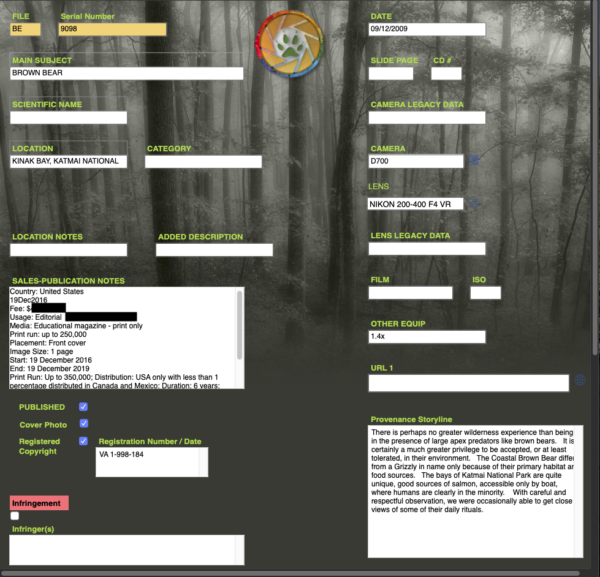
Tap Forms offers a lot of other capabilities I have yet to explore, such as creating reports. There is also a cloud-sync feature that enables you to access your data on your phone or tablet, which I am not sure I would have use for personally as I do all of my editing at a desktop. I have no need to store thumbnails within the database as I have Lightroom, and images can make a database grow pretty quick in size. But they offer examples say if someone wants to have a DVD database and have the cover image in the record. Database tools like this are also useful for museums or art curators who wish to keep track of the provenance of a certain piece. Adding a photo and the entire history for each art piece is quite easy.


Safe to upgrade
While I am still a new user of Tap Forms and learning its capabilities – I had enough confidence my database data was safe for an OS upgrade. So I am now running MacOS Catalina on my 2008 MacPro. No slowdowns, everything moving just as fast as before the upgrade. I had to say goodbye to a number of old 32-bit programs I had though, none of which brought much heartache.
But my database data – lives on to continue growing…for a while longer.


Quite a story. I’m a Lightroom keyworder. In terms of slides I didn’t have that many because when I resumed my interest in photography it was not too far from the digital age. I scanned some years ago but at this point I think the rest will be history.
Same here for LR, as well as collections for all sorts of stuff. I just have plenty of other info that I don’t have a place for in LR. The work of digitizing slides is enough to keep me from digging into them too seriously, the favorites have already been pulled out and done for the most part I think.
Yes, scanning is way too time consuming. In the very beginning I had a Polaroid scanner. Whatever is scanned us scanned and whatever isn’t isn’t at this point 🙂
I have one of those Polaroid scanners sitting right next to me under my desk. I hate to think of the dust that has collected inside it! 🙂 I think the last time I used it was when I was still using a PC.
Wow, what a journey, Mark! At one time I had some slides but they were never that special or of value to me and they were somewhere in the process of life, tossed. But then I’m not talking about thousands, maybe a couple of hundred. Your ingenuity, efforts, and successes in keeping the photo database intact and running as you upgrade un-upgradable hardware with newer OS software are to be admired. 🙂
I suppose the old saying of “if there’s a will, there’s a way” may apply in this unique situation. 🙂
I have just finished a long work day and if I wasn’t tired before, I feel so now 🙂 Keeping pace with technology, is that getting easier or harder, I wonder.
I had a conversation about this topic only a couple days ago when I wondered how people were coping with the thousands of photos they take year in, year out. My wife, who rarely takes photos and only does so with her phone, realised recently that she had over 5000 photos and she was rather shocked. I showed her how to use the AI search which went some way to alleviate her anxiety about finding photos, but it did get me thinking about how people sort, store and find photos considering the numbers people take. I have several friends who take 5000 photos every two or three months with no apparent rhyme or reason behind their storage methodology. You already know, I think, my method for this problem but I can still imagine how it would weigh on some people’s minds. Gone are the days when it was just a few shoes boxes or a filing cabinet to sort through, now it’s Gigs and Terabytes; professional and amateurs alike it would seem. At least, it is quite apparent that you are way ahead of the pack Mark, so good for you.
LOL! Sorry Cedric. I had this post in draft for a while wondering where I wanted to take it. I just kinda went with the flow and figured those who needed something from it might find a hint or two.
I have a feeling the vast majority of people with personal photo archives are much like your wife. Just keep them on your phone, or in the cloud, and simply search by locations, dates, or using the face recognition AI. And for that matter, my personal photos are much that way.
I suppose I had more of a business need on the other side of the photo spectrum for tracking licensing and such, as well as just having some process that a photo goes through as I develop it after it leaves the camera.
I expect this is all much too involved for 90%+ of the folks out there. And if you were to see my office, you wouldn’t think that I would be this particular about organization. 🙂